
USI Rave Alert is the University’s official notification system that gives immediate messages—via email, text message, and voice message—about emergencies, severe weather, crime and other incidents impacting the University community. Everyone with an active USI email address is automatically enrolled in the Rave Alert system. You can also register your mobile, home or office phone number(s) to receive text and voice alerts and add additional emails if desired.
While Rave Alerts are the main sources of emergency messages to the campus community, Screagle Watch is a mobile app that provides valuable added safety features from your mobile device. Read more below.
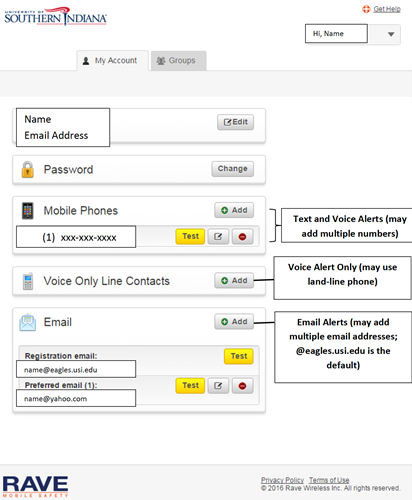 On the My Account screen you can:
If you are no longer affiliated with the University of Southern Indiana and want to completely opt out of future USI Rave Alerts, send an email to IT@usi.edu and, in the subject line and in the body of the message type, "Remove USI Rave Alert Account."
If you are a current student or employee with an active eagles.usi.edu email account, you may not completely opt-out of Rave Alerts*; you will continue to receive alerts to your eagles.usi.edu account. You may, however, edit your account information as described above to remove other email addresses, mobile phone numbers and landline phone numbers from the service.
*The registration process for current students and employees is automated and updated daily. All active eagles.usi.edu email accounts are automatically included. If you use the opt-out method above, your eagles.usi.edu email will be re-added to the Rave Alert service during the next update.
 Screagle Watch
Screagle Watch is a free mobile app available for iOS and Android devices that allows USI students, employees, and the public to access a variety of safety features on their personal devices. Screagle Watch is available on the Apple App Store and the Google Play Store.
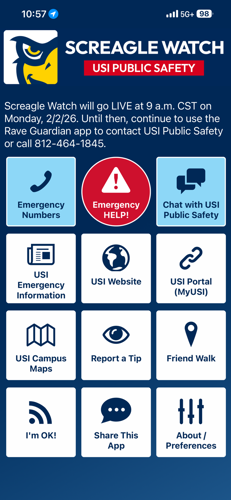
The Screagle Watch app provides several key features that make it an important safety resource for all users:
The call USI Public Safety button allows on-campus users to quickly call the USI Public Safety emergency line with the touch of a button. Those off campus may use the call 911 option for emergencies.
Users on the USI campus or vicinity may press this button to share their location with USI Public Safety Dispatch and receive the option to dial the Public Safety emergency line.
The chat function also allows users to directly and anonymously contact USI Public Safety Dispatch via real-time chat to report an incident or request assistance, including the ability to share their location. This functionality works only on the USI campus or its vicinity.
The app includes buttons with links to the USI Emergency Information website, the main USI.edu website, and - for students and employees - the USI Portal (MyUSI).
This button links to the USI campus map and also has a button linking to the USI/METS shuttle bus service routes.
The user has the option to call the USI Public Safety non-emergency line or complete and send an in-app tip report directly to Public Safety.
This button allows users to set a safety timer with one of their phone contacts. If the timer expires, the contact will receive a notification and be able to check on the user.
In the event of an emergency situation on campus, afterwards, the user will be able to send a short "I'm OK!" notification to their phone contacts to let them know the user is safe.