Manually registering a device will require the MAC address of the device's wireless card. Instructions on how to get the MAC address varies between devices; it is typically located in the settings area. If you need help finding the MAC address or registering a device please contact the IT Help Desk.
Go to https://wifi.usi.edu and login with your USI username and password.
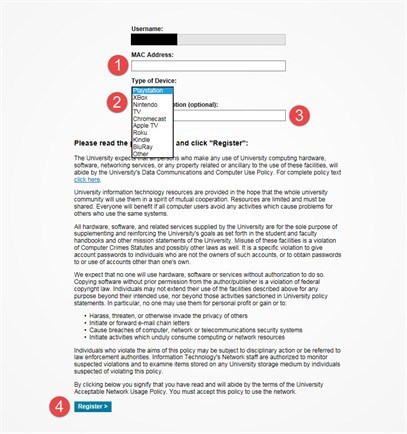
Click "Add New Device" on the Home Screen.
Step 1: Type your device's MAC Address (A MAC Address looks like: xx:xx:xx:xx:xx:xx)
Step 2: Choose what device you are registering (If not listed choose "Other")
Step 3: Name your device (example: My PS4)
Step 4: Click Register to finish

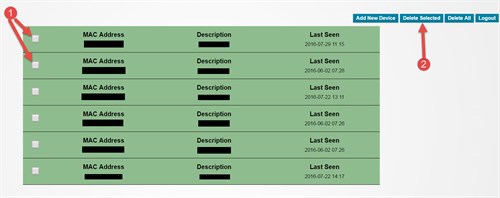
Go to https://wifi.usi.edu and login with your USI username and password.
Step 1: Select the device(s) that you want to delete
Step 2: Click "Delete Selected"